dsp-backend
This module is part of the DSP — see the full documentation in dsp-docs. The information below covers this module only.
Purpose
The dsp-backend is the DSP REST API: it exposes business data, territorial hierarchy, downloads, and map configuration to the frontend and other consumers.
Responsibilities
- Serve business data from the operational database (
dsp-db) — never full geometry. - Expose installation configuration (labels, hierarchy, screens, KPIs) via an external file, without changing code.
- Expose map layer configuration (base maps and layers) consumed by the frontend map component.
- Proxy WFS to GeoServer Download for search and CSV file download on the Downloads screen.
Stack
| Item | Value |
|---|---|
| Language / runtime | Java 21 |
| Framework | Spring Boot 3.4.2 |
| Build | Gradle |
| ORM | JPA/Hibernate + hibernate-spatial + PostGIS |
| API documentation | springdoc-openapi |
| Boilerplate | Lombok |
How to run
Or via Docker, orchestrated by dsp-core — which offers two modes: demo (synthetic seed, no external database) or full installation (adopter data via JDBC source). In Docker the container does not publish a port on the host: the API is reached through the core gateway at /dsp-backend.
Environment variables
Defined with defaults in src/main/resources/application.properties.
| Variable | Purpose |
|---|---|
SERVER_SERVLET_CONTEXT_PATH |
API context path (default /dsp-backend). The gateway uses the same prefix externally, with no rewrite |
DSP_CORS_ALLOWED_ORIGINS |
Allowed CORS origins. Through the gateway the frontend calls the API on the same origin; this covers external consumers and local dev |
DSP_INSTALLATION_CONFIG_FILE |
Path to the installation configuration JSON |
DSP_MAP_LAYERS_FILE |
Path to the map layers JSON |
DSP_DOWNLOAD_THEMES_FILE |
Path to the download themes JSON (downloadThemesConfig.json) |
DSP_ABOUT_CONFIG_FILE |
Path to the About page index JSON (about-config.json) |
DSP_ABOUT_CONTENT_DIR |
Path to the folder with Markdown files for About page tabs |
DSP_GEOSERVER_WFS_BASE_URL |
GeoServer Download WFS base URL for download export |
DSP_ABOUT_CONFIG_FILE / DSP_ABOUT_CONTENT_DIR |
Custom About page (generated by the core ./config.sh) |
SPRING_DATASOURCE_URL / SPRING_DATASOURCE_USERNAME / SPRING_DATASOURCE_PASSWORD |
Connection to dsp-db |
SPRING_JPA_HIBERNATE_DDL_AUTO |
Schema management (keep none) |
REST endpoints
| Endpoint | Description |
|---|---|
GET /config/installation |
Installation configuration: hierarchy, screens, KPIs, and screens.home.detail.fields |
GET /geoServices/getRegions |
List of regions |
GET /state/getAll |
List of states |
GET /state/getCitiesByUf/{idState} |
Cities by state |
GET /state/getUfsByRegion/{region} |
States by region |
GET /downloads/themes |
Themes available for download (catalog in downloadThemesConfig.json) |
GET /config/about |
Configurable About page content: enabled, bannerTitle, and tabs[] (id, label, content as Markdown) |
POST /downloads/search |
Search items by hierarchy/theme (level 2 required, level 3 optional) |
GET /downloads/file |
CSV file download via WFS proxy |
GET /map/getBaseMaps |
Configured base maps |
GET /map/getLayers |
Map layers (via DSP_MAP_LAYERS_FILE) |
POST /totalizer/ |
Totalizers |
GET /totalizer/getDeatilsByIdentifier/{identifier} |
Detail by identifier |
GET /totalizer/getDetailsByCoordinates |
Detail by coordinates |
GET /territory/options |
Territory options by hierarchy |
GET /territory/boundary-box |
Territory bounding box |
Installation configuration (labels, screens, KPIs)
Territorial data (L1/L2/L3 units) lives in tables dsp.territory_level_*. The display names for filters ("Level 1", "Region", etc.) come from an external JSON file, with no code changes required.
| Item | Value |
|---|---|
| Default file | dsp-backend/src/main/resources/installationConfig.json |
| Property | dsp.installation-config.file |
| Environment variable | DSP_INSTALLATION_CONFIG_FILE |
Accepted formats: classpath:installationConfig.json (default), file:/etc/dsp/installationConfig.json, or an absolute path on disk.
The frontend consumes GET /config/installation to build filters, screen titles, and KPI cards. Configuration is loaded once and cached in backend memory — after changing the file, restart the application.
screens.home.detail.fields is the exclusive list for the AOI detail panel (order preserved). Each item has field (column name in the destination, or calculated.* key) and label. Empty or missing list: the API returns [] and detail returns attributes: {} — the current UI stays on the structural DTO. Non-empty list: detail resolves attributes with exactly those keys.
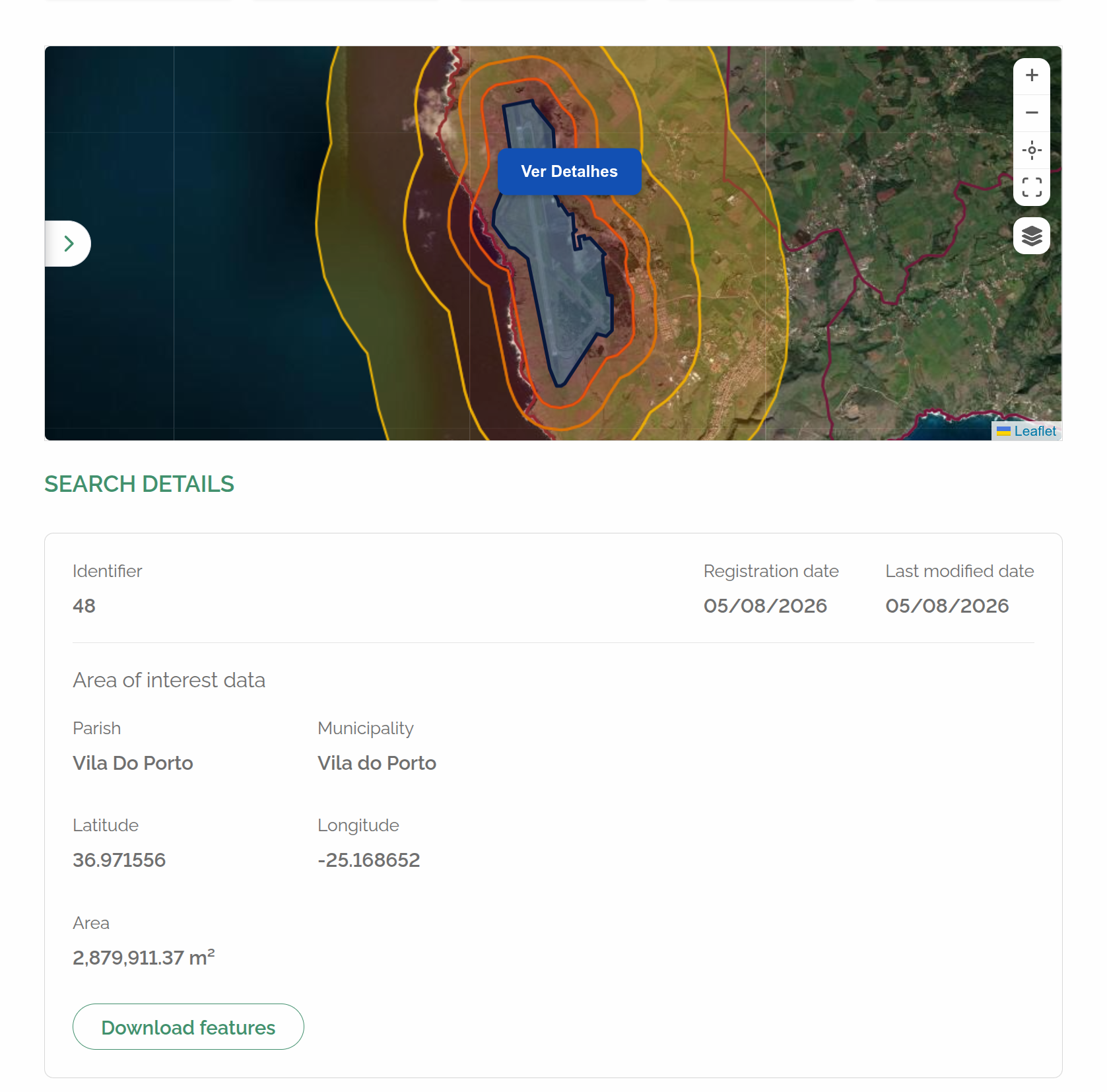
Caption: area-of-interest detail panel when screens.home.detail.fields is empty or missing — the UI uses the structural DTO (latitude/longitude, territory, alteration date) instead of the attributes map.
field keys:
- AOI migration columns:
id,created_at,updated_at,area, and extras frompersist_columns(e.g.nome,latitude). - Calculated in the application (not a column):
calculated.latitude,calculated.longitude,calculated.territory_level_2_name,calculated.territory_level_3_name.
GET /totalizer/getDeatilsByIdentifier/{identifier} and GET /totalizer/getDetailsByCoordinates return the structural DTO (compatible with the current front: centroid latitude/longitude, territory, alterationDate, etc.) and the attributes map. Keys in attributes match fields[].field (not camelCase). Dates in attributes use yyyy-MM-dd. otherIds and download are not included in attributes.
The physical last-alteration column in dsp-db and WFS is updated_at. The structural detail JSON keeps alterationDate; in attributes the key is updated_at.
JSON structure:
{
  "hierarchy": [
    { "key": "level1", "label": "Level 1", "placeholder": "Select level 1", "order": 1 },
    { "key": "level2", "label": "Level 2", "placeholder": "Select level 2", "order": 2 },
    { "key": "level3", "label": "Level 3", "placeholder": "Select level 3", "order": 3 }
  ],
  "screens": {
    "home": { "...": "title, hierarchyKeys, identifier, detail, ..." },
    "downloads": { "...": "title, hierarchyKeys, theme, section titles, ..." }
  },
  "kpis": {
    "maxCards": 5,
    "primaryCode": "AREA_OF_INTEREST",
    "cards": [ { "code": "...", "label": "...", "unitOfMeasurement": "...", "accentColor": "...", "order": 1, "required": true } ]
  },
  "areaOfInterest": {
    "areaUnit": "ha",
    "areaUnitLabel": "ha"
  },
  "formats": {
    "date": "dd/MM/yyyy",
    "dateTime": "dd/MM/yyyy HH:mm:ss"
  },
  "map": {
    "initialView": {
      "mode": "territorial_bbox",
      "latitude": null,
      "longitude": null,
      "zoom": null
    }
  }
}
Example with manual mode:
Example with planet mode:
| Block | Purpose |
|---|---|
hierarchy |
Labels and placeholders for levels level1 / level2 / level3 — keys are stable (match GET /territory/options?level=…); change label, not key |
screens.home / screens.downloads |
Which levels each screen uses and field labels. In screens.home.detail.fields, the exclusive AOI detail list (field + label) |
kpis |
Home cards (labels, units, colors) |
map.initialView |
Map open/reset mode on Home. Required mode: territorial_bbox (frame via GET /territory/boundary-box; if no L1/L2/L3 territorial level is configured in ETL, ./config.sh writes planet explicitly), manual (requires latitude, longitude, zoom), or planet (always center [0,0] zoom 0) |
areaOfInterest |
Property area unit/label (areaUnit, optionalLabel) — the numeric value comes from dsp.area_of_interest.area, computed by kpiCalculationJob from geometry on geo-target |
formats |
Date/time display patterns in the UI |
Between frontend and backend, dates always travel as yyyy-MM-dd (date only) or yyyy-MM-dd'T'HH:mm:ss (date + time); the UI converts to formats.date/formats.dateTime for display.
What does not go in this file: territorial units (dsp.territory_level_* tables + migration job), WMS/GeoServer layers (GET /map/getBaseMaps and GET /map/getLayers), download catalog (downloadThemesConfig.json), and ETL source→destination mapping (migration job application.yaml).
TotalizerService (POST /totalizer/)
Configuration (GET /config/installation) defines which cards appear on Home (kpis.cards[]: codes AREA_OF_INTEREST, THEME_1…THEME_4, labels, units, colors, and layer on themes). Values come from POST /totalizer/ with an optional territorial filter (level2Ids, level3Ids).
Card (code) |
Aggregation | Source on dsp-db |
|---|---|---|
AREA_OF_INTEREST |
Property count + sum of area |
dsp.area_of_interest (L2/L3 filter via territory_level_3_id) |
THEME_1…THEME_4 |
Sum of value where kpi_name = card.layer |
dsp.kpi_measure (same territorial filter) |
Each theme card’s layer must match kpis.themes[].layer-name in the job application.yaml and the table name on geo-target (dsp.<layer_name>).
With theme_count: 0 on the adopter, only the AREA_OF_INTEREST card is generated; kpi_measure stays empty after the KPI job.
Job detail: KPI calculation.
Configuration cache
InstallationConfigService keeps the JSON in memory. After ./config.sh, restart the dsp-backend container (or local ./gradlew bootRun) so new cards or theme_count show up in the API. The frontend also caches GET /config/installation for the session — hard-refresh if cards changed.
Downloads (GeoServer Download WFS)
The download theme catalog comes from downloadThemesConfig.json, generated by the core ./config.sh from area_of_interest and etl.layers[]. The backend:
- Validates territory (level 2 required, level 3 optional) in
dsp-db. - Builds a CQL filter per theme.
- Queries GeoServer Download via WFS (
GetFeaturewithresultType=hitsfor search;outputFormat=csvoroutputFormat=gpkgfor download) atDSP_GEOSERVER_WFS_BASE_URL. - For themes with features in the extent, reads
updated_atvia WFS (sortBy,count=1) and fillslastUpdatein the response (business date). - Reads the
generated-atmetadata on the storage object (HeadObjectfor the theme’s first format) and fillslastFileGenerated. The job writes that instant in the same UTC ISO as the CSV (yyyy-MM-dd'T'HH:mm:ss'Z', example2026-09-10T16:55:19Z), without fractional seconds — it does not useInstant.toString(). Without an object or with storage down, the field isnull. - Returns status or file bytes to the frontend — the browser does not access GeoServer for download files.
CSV comes from the bucket or, when the object is missing, from WFS outputFormat=csv. GPKG follows the same path (outputFormat=gpkg) on download. In search, CSV and GPKG are marked available when there are features in the extent; GPKG is also available when a bucket object exists even with an empty extent (pre-generated file). Download still prefers the bucket and falls back to WFS for both formats. The area-of-interest ZIP includes only the requested format (format=csv or format=gpkg) for themes that declare it and have features in the extent. The fallback GeoPackage uses EPSG:4326; the file produced by the job keeps the layer SRID.
If updated_at is missing in WFS, search still works and lastUpdate is null (UI shows —). Without generated-at, lastFileGenerated is also null (UI shows —). Files already in the bucket only get generated-at on the next successful generation.
Download CSV uses UTC date/time, ISO 8601 text yyyy-MM-dd'T'HH:mm:ss'Z' (example 2026-08-18T18:43:48Z), without fractional seconds. The job writes in that pattern; GeoServer Download uses the same csvDateFormat with TZ=UTC. The backend only forwards bytes — it does not reconvert dates. Files already in storage only appear in the new format on the next generation.
About page configuration
Institutional About page content can be configured by the adopter via index file + Markdown, same pattern as installation configuration.
| Item | Value |
|---|---|
| Property (index) | dsp.about-config.config-file, default file:../dsp-core/config/about/about-config.json |
| Property (content) | dsp.about-config.content-dir, default file:../dsp-core/config/about/ |
| Environment variables | DSP_ABOUT_CONFIG_FILE, DSP_ABOUT_CONTENT_DIR |
AboutConfigService reads the index JSON (file:/classpath:/plain path) and, for each tab, reads the corresponding .md inside contentDir, building the response; the result is cached. If enabled=false in the index or the index file is missing, the response has enabled=false and empty tabs — the application does not fail for that. Malformed JSON or a missing referenced .md results in a 500 error (same pattern as InstallationConfigService).
GET /config/about is exposed by AboutController/AboutApi and returns AboutConfigResponse (enabled, bannerTitle, tabs: [{ id, label, content }]), where content is already the Markdown read from the corresponding file. The first tab in the list is the one opened by default in the frontend.
Integration with other modules
- Depends on core for the
dspschema in Postgres and for external filesinstallationConfig.jsonandmapLayersConfig.json. - Consumed by frontend via REST API (
VITE_DSP_API_URL). - Reads dsp-db only — never accesses
geoserver-dbdirectly. - Queries GeoServer Download via HTTP/WFS for file downloads.